Pages

Saturday, 8 December 2012

What is Logon load balance

Logon Load Balance | SMLG

During the request message server check for the least loaded instance in the group and route the request to that instance.

If instead of logon group we specify the instance then the request is routed to that instance only. Means no load balancing occur in this case.

difference between R3trans and SAP-DBA

R3trans | SAP-DBA

R/3trans is the R/3 system transport program which can be used for transporting data between different SAP systems ,even when they dont belong to the same group. R3trans normally is not used directorly but called from the Tp controle program or by the R/3 upgrade. Tp is the basic tool for the transporting the request.

Saturday, 1 December 2012

SAP Software Change Registration (SSCR)

SCCR Key | SAP Software Change Registration Key


SAP Software Change Registration (SSCR) is used to manage all changes by the customer to the SAP source code and SAP Dictionary objects. Everytime you register SAP issues a 20-digit registration key, which is issued for each object and SAP provides no guarantee for these types of modifications.

Advantages:
This supports rapid error location and correction
Prevents unintentional system modification
Ensures system stability
Overview of all the modifications facilitates the processing of release upgrades.
Here is a quick direct link to SSCR at SAP Support Portal.

SPOOL Administration - SPAD

SPOOL Administration in SAP | SAP SPOOL

 
It is used to output the document to a printer, fax, email and SMS etc.
It is only the process which is used to display the documents before they get printed.
Once a spool request is generated in the system, It can be printed to any printer with n no of copies, at any time.
Where as normal printing, the document will not be available once it is printed.
We can change the output format at any time.

Spool work flow:

A dialog user or a background process initializes a print request.
The print requests are stored in a location which is determined by a parameter ‘RSPO/Store_location = G/DB’.
G- Global directory at OS level
DB- In database tables.

This location is referred as “Temse”( Temporary Sequential File).
Temse is stored in Global directory when it is referred as ‘G’. It is stored in database tables TST01 ; TST03. If it is referred as ‘DB’ .

By default the value is ‘DB’.

G: (Global Directory on Application Server):

1. If G is specified it is stored at OS level
2. The printing will be faster if there are less no of documents. Because from file system to spooler

The communication faster than database to host spooler

Disadvantages:

1.A dedicated backup has to be planned to save the contents of Global directory.
2. When the records are more the printing consumes more time because of ‘Lack of indexes’ at file system.

Advantages:

1. No special attention is required to backup the spool requests.
2. RDBMS rules are inherited to spool requests, because they are in the Database.

‘Temse’ stores spool requests

Spool process gets initiated and reads the contents from ‘TST01’ name of the Author, no of copies name of the printer and spool data from ‘TST03’. And converts spool requests into “Output Requests’ (Printer specific requests).

The communication between the spool process & Host spooler depends upon the type of “Access Method”.

1. Local Access Method: The spooler process and the host spooler resides on the same server, then LAM is used.
On UNIX- OS Access Method ‘L’ is used (SAPLPD)

(To print the spool requests ------à # lpstat (Queue Name))

On windows Local Access Method ‘C’ is used.

It is direct OS called method.

Note: The printer can be connected to directly or we can send request too print server.


2. Remote Access Method : The ‘Spool Process’ &’Host Spooler’ request on different machines

On UNIX machines Remote Access Method ‘U’ is used It is derived from UNIX Berkley Protocol.
On windows SAP proprietary protocol type ‘S’ is used.

3. Front end printing:

The spool process is dedicated to the user requests and it will not be freed until the process finishes the task.

The spool process are configured by parameter ‘RDISP/WP_NO_SPO’
Depending on the resources as many no of spool processes can be configured.

In order to avoid spool congestion configure front end printing process to either 2 or 3 i.e. at any given point of time 2 or 3 work process can go into front end mode.

Goto SPAD to define printer.

Click on ‘Output Device’------à Create -------à

Specify the name of the output device. Ensure that the naming conversation are followed to define the name of the printer.

Provide a short name

Specify the device type (i.e. serial no & manufacturer of the printer)

If the device types are not available, communicates with SAP or the vendor, get the device types and import it to SAP system.

Goto SPAD ------à Utilites-------àdevice types ---à Import

We can also import ‘Character sets’.

Specify the spool server

Spool Servers: The application Server which is configured with at least one spool process is called as spool server.


Spool servers can be logical or real

Goto SPAD -----à click on spool servers--àclick on change(F8)---------à Create

We can create our own spool servers.

Logical Spool Serever:

Define the logical spool server and assign it to a real spool server

In order to select Logical Server
Select [ ] Logical Server ------àspecify mapping real server alternate server

Also [ ] Allow load balancing.

Device Class : Specify whether it is a printer , Archiving , fax etc…
Authorization Group: For securing the printer
Specify Model, Location & Message

Access Method : Specify the Access Method specify the host name

[ ] Do not query host spooler for output status.

Output Attributes: Specify

Tray info:

“RDISP/WP_NO_SPO_PRO_Max” to limit the users for front end printer.

Spool Monitoring: Spool requests are monitored in transaction SP01

Go to SP01 to display ‘Spool requests’ and ‘Output requests’ specify the ‘Spool request ‘ number or user id, Date & Time, Output device to display the Spool requests.

The spool request has the following statuses:

‘-‘ : The request is not sent to the host system (output request does not exist)
‘+’ : Spool request is generated and stored in “Temse’.
‘Waiting’ : The spool request is waiting to be processed by a spool process.
‘in process’ :Te spool work process is processing the spool request into output request for printing.
‘Printing’ :Te host spool is printing the request. If the RS system does not receive any status from the host spool, the status is dispatched for one minute and shifts the status to ‘Completed’

SPOOL Administration in SAP
Note: There are instances where the printing is continued and the status is set to “Completed”. This is due to the option set “[ ] Do not query host spooler for status”

‘Completed’: Generally the completed status donates that output request completed successfully, because the ‘spool system’ communicates with ‘Host Spool’ and if it doesn’t receive any status update within one minute , the status is set to “ Completed”

‘Problem’ : The output request is printed with minor error (Page Format, Margins).

‘Error’ : Indicates an error that the ‘Host Spool’ system is not reachable can a network error.

‘Archive’ : The request is waiting to be archived. Archived requests will be stored in external devices and are available to print at any time SARI & SARA.

Transaction SPIC is used to check the consistency of Spool Mechanism

Go to SP12 for “Temse” administration

It is used to identity the size based on users and applications in the “Temse”

SAP Installation and Upgrade Screenshots

SAP Installation and Upgrade Screenshots | SAP Upgrade

Attached is the link for all important installation that i have documented and would like to share to explore more on Basis activities.

http://rapidshare.com/files/284606380/install_upgradeSAP.rar

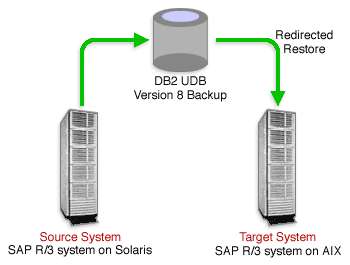
SAP DB Restore/Refresh

SAP System refresh | SAP DB Refresh/Restore


System/DB Restore Procedure:

Make a note of SAPLICENSE of the target system.
Check for the kernel version of target system is same as the source system. Other wise
Upgrade the kernel in target system to the same level of source system.
SAP DB refresh / System refresh
Check that the directory structure of the target system must be same as the source system Source system

Target system:

Copy the .aft, .tib and backPRD.log files from source system to destination system. These .aft& .tib files must be of the same date and time when the backup was taken. .aft file is the offline backup file-it contains all the information regarding offline backup .tib file contains information regarding tape initialization. BackPRD.log contains the entire l the backups log information.
In  .aft ,.tib files replace Source system SID<PRD> with target system SID<DEM>
Copy the trace file from source system to destination system.This trace must be of the same date and time when the backup was taken.
Connect to ERPDBA to restore   and follow the below screenshots.
Now the restoration process will start.

After Successful restore Shut down the database to create the control file.
Rename the present control files in target system. Control file is located n four locations
H:oracleDEMsaparchcntrl
G:ORACLEDEMSAPDATA1cntrl
L:oracleDEMsaparchcntrl
I:oracleDEMoriglogAcntrl
Create the control file with the old trace file copied from source system with RESETLOGS option In the trace file copy the text from
STARTUP NOMOUNT
CREATE CONTROLFILE REUSE DATABASE “PRD” NORESETLOGS ARCHIVELOG
to
CHARACTER SET WE8DEC

In a text file and change the Create command as follows.
CREATE CONTROLFILE SET DATABASE “PRD” RESETLOGS ARCHIVELOG
Connect to Sqlplus /”as sysdba” and then paste the entire text then control file will be created.

Open the database with reset logs.
Initialize SAPconnet for this follow the screenshots.
 Change the Environmental variable of  DBS_ORA_SCHEMA to SAPR3.
Then restart the system and up the MMC.
Apply the sap license of the target system that was noted before restore…

What is SLICENSE in SAP

SLICENSE in SAP | SAP SLICENSE


SLICENSE – It is a transaction that is used to apply the license to get the runtime support for the system even though it is valid for 30 days (4 Weeks i.e. 28 days). It is recommended to apply license because they are not considered for support.


Goto – Market place www.service.sap.com/licensekey
Click on obtain permanent license key
Select the Installation number based on the component (ERP, NETWEAVER(EP, BI, XI, PI, MI, JDI), SCM, SRM, CRM & Solution Manager).

Specify the system ID(SID), OS, DB, System Type, purpose(DEV, PRD, QAS, TEST etc)
Click on continue to display the hardware key input.
The license key is specific to Customer, Installation number, System Number, Hostname and the Hardware key.

Hardware key is unique (use command saplicense -key )
Specify the Hardware key and email-id to generate and send license key to the mail-id specified, Alternatively select the system and click o
Execute [Slicense] Tcode

Click on > New Licenses
Click on > Install license key and it prompts for the path of the license key, provide the downloaded file path and click on OK to apply the license.

Remote Function Call ( RFC)

Understanding Remote Function Call (RFC) Processes | RFC in SAP-SM59

RFC is used to communicate between SAP systems and SAP to Non-SAP systems using TCP/IP protocol.  RFC’s are defined in [SM59]. There are 4 types of RFC’s
1. Asynchronous RFC
Remote Function Call in SAP
2. Synchronous RFC
3. Transactional RFC
4. Queue RFC

1. Asynchronous RFC – (Like a post card). The sending system may or may not receive it. i.e. there is no acknowledgement from the receiving . The transmission is not reliable.

2. Synchronous RFC – It is not like ARFC. It gets an acknowledgement from the target system. (like a register post).
If the receiving system is not available the process goes into RFC/ CPIC/ Sleep mode and waits until it is wakened by the target system. Target system/ Receiving system may be busy i.e. all the resources are used up. This is reliable but time consuming and expensive (Client Copy) the job should get finished.
Note: SAP uses CPIC protocol SAP specific (Common Programming Interface for Communication) to communicate between system.

3. Transactional RFC – TRFC – It is an advanced version of ARFC and SRFC. The request goes to receiving system if it is not handled a Transaction ID is generated by the source system. A program RSARFCSE is scheduled in the background to run for every 60 seconds. Transaction SM58 is used for Transactional RFC. It is used to document all the transactional ID’s and ensure that they are received by the recipient system. This is consistence and reliable.

4. Queued RFC – It is an advanced version of TRF and ensures that the transaction is committed based on FIFO/ Queue. It ensures transaction consistency of LUW and reliability of data transmission.
SMQ1 – to monitor the outbound queues of a sending system refer SCOTT for FAX…
SMQ2 – Provides interface to monitor Inbound queues.


Friday, 30 November 2012

SAP Performance Tuning

Performance tuning in SAP | Performance Tuning Checklist

This complete journey should be completed within 600 Milli seconds on an average or goes up to 600 Seconds Max.

1. Front End Time/ GUI Time : Time taken by the user to reach the dispatcher is called as Front end time. The GUI time should not exceed more than 200 M.Sec. If it exceeds this consider the following.
1. User desktop is slow
2. If this is same with all the users, network might be congested.
3. The user request is expensive (FI and basis will logon to the central instance. Rest of all the users are allowed to login to Dialogue instance)
Note: GUI response time is not considered as a part of the Dialogue response time because the request is not received by the dispatcher.


2. Wait Time: The amount of time the user request sits in the queue. Generally it should not be more than 50 M.Sec or 10% of the response time. If the time exceeds, consider the following.
1. The work process are not sufficient to handle the user requests. (1:5)
2. There are sufficient processes but the existing process are held with expensive request.
Login/disable_multi_gui_login.


3. Roll in Time: The work process copies the Roll in User context into WP task handler. The time taken by the work process to copy the context (Roll In) is referred as Roll in time. Generally it should not be more than 50 M.Sec. If it is more than this consider the following.
1. The user context is heavy to Roll in (User might having more authorizations, parameters)
2. Minimize the authorizations.


4. Roll Out Time: The time taken by the work process to copy the information from its local memory to Roll Area/ Roll File/ User context/ Roll buffer and it should not be more than 50 M. Sec.

5. Roll Wait Time: During the processing when a dialogue process communicates with RFC’s and waiting for the response at this time the user context is copied/ rolled back to BTC —- RFC — Target system.


Roll wait time Sleep
Note: Roll wait time is not considered as a part of response time. If the roll wait time increases consider there is a bottle next on the RFC communication.


performance tuning
6. Processing Time: The time taken by the work process to process the user request using interpreters. The processing time should not be more than 200 M.Sec. If the processing time is more we can consider either ABAP program is expensive, screen is expensive or SQL statements are expensive.

7. CPU Time: When the request are processed using interpreters an amount of CPU is utilized to process the request using CPU resources is referred as CPU time.
As CPU time is included in processing time it is not calculated in the response time.
CPU time should not be more than (40% of the Dialogue response time – Wait time). If CPU time is more consider tuning ABAP Programs Refer to ABAP development team (Also Refer SE30 ABAP Run time Analysis, ST05 Performance Analysis)


8. LG Time: Load and Generation Time: Time required to load the objects such as source code, GUI info, screen info from the database and generate these objects.
(Refer LC10 : Live Cache). It should not be more than 200 M.Sec.
Run SGEN tcode after patch application, upgrade, new installation or when there is a mass change in the programs.


9. Enqueue Time: The time taken by the process to communicate with enqueue for obtaining the lock while updating a record is referred as Enqueue time. Enqueue time should be 5 M.Sec. on a Central instance and 100 M.Sec on a Dialogue instance. If it exceeds more than this time we can consider that the enqueues are not sufficient or Enqueue table overflow. or WP waiting for a lock.

10. RFC or CPIC Time: The time taken by the process to communicate with external interfaces is referred as RFC time. It should be as minimal as possible. (Communication between any BW/ CRM/ SCM system). There wont be any threshold value as it depends on External system.

11. Database Time: The time taken by the process to reach the database and process the request. Generally it should not be more than 40% of (Response time – Wait time). It is similar to the CPU time. IF DB Time is more consider the following.
1. The DB statistics job is not scheduled in DB13.
2. The DB resources are stake(CPU and Memory Utilization) i.e. Resource bottle neck on DB.
3. The DB Buffers are not sufficient.
4. Missing indexes in DB02.


12. Dialogue Response time: The time taken by the Dialogue process to process the request which includes [Wait time ........ To ......... Roll Out Time]

What is a Dispatcher


Dispatcher is used to handle the user requests that are coming from SAP GUI using DIAG (Dynamic Information Action Gateway) protocol on port 3200 + Instance Number.
(3201, 3202 etc)
Dispatcher manages all the work process and maintains a queue. Once the request is sent to dispatcher the dispatcher keeps the request in queue. Based on the availability of work process it will assign the process to the user request based on FIFO
(First In First Out)
User Buffer – Once we logoff everything is rolled off.
Public Buffer – Until the instance is restarted
Dispatcher

Types of Work Processes

Work processess

Work Processess in SAP | Work Processess in R/3

Even though the Work processes are unique at OS level SAP differentiated between the work processes based on the nature of work.
The process are determined by the instance name DVEBMGS<Instance_No>
For Dialogue instances the work process will be denoted as D01, D02….
  1. D – Dialogue
  2. V – Update
  3. E – Enqueue
  4. B – Back ground
  5. M – Message
  6. G – Gateway
  7. S – Spool
1. DIALOGUE ‘D’
It is only the process which communicates interactively with the users. There should be atleast 2 Dialogue work process per instance. Dialogue work process initiates Update, Background and Spool.
2. UPDATE ‘V’
It is used to update the transactions in the database. It is initiated by Dialogue process. There should be atleast 1 Update in the entire system. It is also recommended to have an update process for every 5 Dialogue.
3. ENQUEUE ‘E’
It is used to provide locks for the records that are going to be updated. It ensures consistency for updates. There will be only 1 Enqueue configured in the system during the installation. It is possible to have more than one enqueue provided they are installed or configured on the central instance.
4. BACKGROUND ‘B’
The tasks which are expensive or time consuming are scheduled to run in the background mode non-interactively. There should be atleast 2 background work process in the system
5. MESSAGE ‘M’
There should be only 1 message server in the entire R/3 system. It is used to manage all the dispatchers. It is used to load balance the requests to identify the least loaded dispatcher.
It is also used to provide locks to the request that are coming from Dialogue instances.
6. GATEWAY ‘G’
It is used to provide a means of communication with SAP and NON-SAP systems. There will be only 1 gateway for each instance.
7. SPOOL ‘S’
It is used to print the documents to a printer or output to a fax machine etc. There should be atleast 1 Spool process in the entire system. It is also possible to configure more spool process depending on the print/ spool volume.